Been thinking about starting your own business?

Tell Symbiont the idea you keep putting off. We’ll help you research it, shape a first product and work through the design and build in one project chat.

Research and a product concept are free. No card to start. Sign in to save your project and continue.

Give that idea a place to start.

Your first materials help you choose a customer, shape an offer and decide what to test. Review the work before choosing to continue with design and development.

Here’s what your idea becomes first.

An idea: A service where someone waits in a restaurant queue for you. Start with something you can read, question and use to decide what to do next.

Illustrative starter pack, not a completed Factory run. The source supports an existing service category; the customer and product choices below are hypotheses.

Research note

Taskrabbit lists a London queueing service, including restaurant queues. There is an existing alternative to compare with.

This does not establish demand for a separate restaurant app, what people would pay or whether they would switch from their current approach.

Open the research note
Product concept

Arrange one queue-sitter booking, with the venue, estimate, confirmation and meeting instructions visible before the customer commits.

Start with one booking, not a multi-city marketplace. The customer group and demand still need testing.

Open the product concept

Next, put a first version in front of people.

After shaping the idea, work through the design and build. This QueueMate example shows a booking prototype and a useful UX change. Open the screens and try the flow.

Illustrative conversation adapted for Symbiont. Actual screens from Figaro’s QueueMate demo; sample data, no real bookings or payments.

Start with a job someone would pay for.

Example conversation

  1. You

    I’d pay someone to wait in a restaurant queue. Could that be a product?

  2. Symbiont

    What would you actually pay to skip: a restaurant queue, a ticket release or a product drop? Pick one to test first.

  3. You

    Restaurants. Give me something I can put in front of people.

  4. Symbiont

    Start with one booking: choose the restaurant, check the wait and price, confirm a queue-sitter. Try that journey with people before building the marketplace.

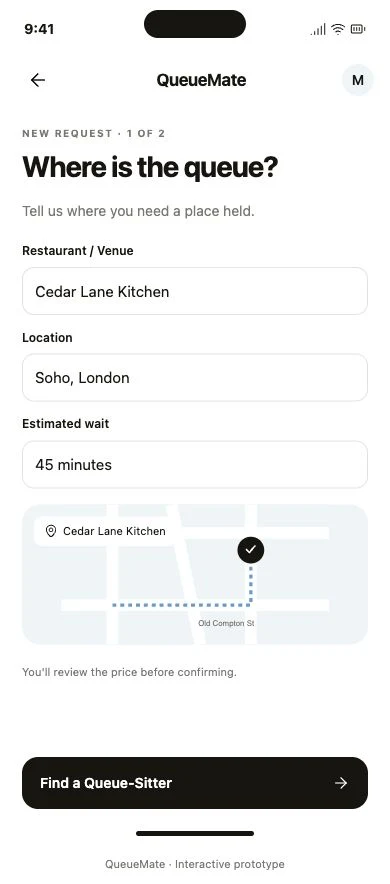
  5. QueueMate booking screen

A first journey you can try

The prototype starts with a venue and estimated wait. Open it and continue to the price review.

Try the booking prototype
Actual QueueMate demo booking screen with Cedar Lane Kitchen, Soho and a sample 45-minute wait.
Actual screenshot of the QueueMate demo prototype. Select to enlarge.

Know what happens next.

Each stage has work to review and a decision to make. Your feedback stays with the project as it moves forward.

Keep the conversation and files together. Ask for a recommendation, open the latest output and request a change before approving the next step.

  1. 1

    Bring the idea you’ve been putting off

    Bring a rough idea, a link or a sketch. Use the project conversation to work through the questions and save the decisions you choose.

  2. 2

    Read your first materials

    Review the research and product concept: who it is for, what to offer, what to test and how small the first version can be.

  3. 3

    Review the design and build

    Approve the direction, review the product flow and ask for changes. The build carries those decisions into code, deployment and QA.

  4. 4

    Put the result in front of customers

    Use the launch materials and release checks to prepare a pilot. Connect your payment account when needed, then measure what people actually do.

See all nine production stages
Research
Sourced market research and alternatives.
Product definition
A named hypothesis, first-version scope and a decision rule.
Product design
The user journey, screens and prototype.
Brand
The product's own name, visual system and assets.
Build and deploy
Code and a deployed application from approved work.
QA
Checks of the core journey, persistence and access.
Go-to-market
Positioning, pitch materials and a first-customer plan.
Payments and launch
Checkout setup and the permissions needed to go live.
Operations
A runbook and ongoing health checks.
Read the full workflow

See the decisions behind an idea.

Our “Tinder for agents” walkthrough uses a real project and production screenshots. Follow the choice of customer, the competing alternatives and the proposed first test.

The useful question is what someone will use, what they do today and what would make them switch. Keep those answers with the work you approve.

Read the real project walkthrough

What to check before you approve

Does the research support the claim? Does the next design preserve your chosen customer? Can a person complete the core journey?

Make the first decision for free.

Start with research and a product canvas. Review the evidence and the proposed first version before you choose to continue.

Start free

Read the service terms and refund policy before continuing with paid work.

Research and product conceptFree
No card to start. A useful first step is deciding what to test, sharpen or stop.
Continue toward a build£20
The launch payment starts the paid workflow and adds usage credit. Generation is metered; additional credit top-ups may be needed. Check the balance and payment details in your project before continuing.

Before you start.

Do I need to know how to code?

You can start with the problem and your knowledge of the customer. AI agents handle the technical work. You review the proposed direction, inspect the results and approve the next stage.

Can I start with an unfinished idea?

Yes. Describe who you might help and the problem you have noticed. You can ask for recommendations in the project chat, leave unknowns open and save a decision when you choose it.

What do I get first?

Research with sources and a product concept: who it is for, what to offer, the first-version scope and the next test. The concept is your product canvas, in plain language. Review both before choosing the paid build path.

Who does the work?

Personal OS runs the AI agents for research, design, code and checks. Symbiont is your project workspace. You review work and authorize the next stage; execution can wait for that decision or available capacity.

What if I want to change something?

Keep the feedback in the project chat and select the output you want revised. Review the updated version before approving. Build revisions follow the same project rather than requiring a new idea.

How much does it cost?

Research and the product canvas are free. The £20 launch payment starts the paid workflow and adds usage credit. Generation is metered, so additional top-ups may be needed. The project shows your usage and balance.

How long does a project take?

Work runs asynchronously. Research, a prototype and a deployed application require different amounts of work; the duration also depends on available capacity and your reviews. Your project shows the current stage and next action.